
Five things you didn’t know you could do with Microsoft Copilot
April 24, 2026
By Thomas G. Stephens, Jr., CPA, CITP, CGMA
For many CPAs, artificial intelligence (AI) has been somewhat abstract up to this point. They likely have heard about what AI can do, but have yet to experience the productivity gains firsthand. Furthermore, they may have not explored Microsoft’s Copilot platform to determine how it differs from platforms such as ChatGPT, Google’s Gemini and others.
This article will unpack five tasks you may not know you can do with Copilot and why they matter for accounting and financial professionals. These should help you get started using Copilot more creatively, efficiently and productively. (Learn more at the K2 Technology Conference June 11-12, 2026.)
1. Analyze data without building formulas
Accounting and financial professionals often work extensively with Excel. But even seasoned professionals can spend hours cleaning data, writing formulas and building reports. Copilot can significantly reduce the time you spend analyzing data.
Consider the example pictured in Figure 1. In this case, all that was necessary to generate the analysis was to enter the following prompt into Copilot: Analyze this data, looking for any unusual trends or patterns. From there, Copilot generated the results, a portion of which you see in Figure 1.
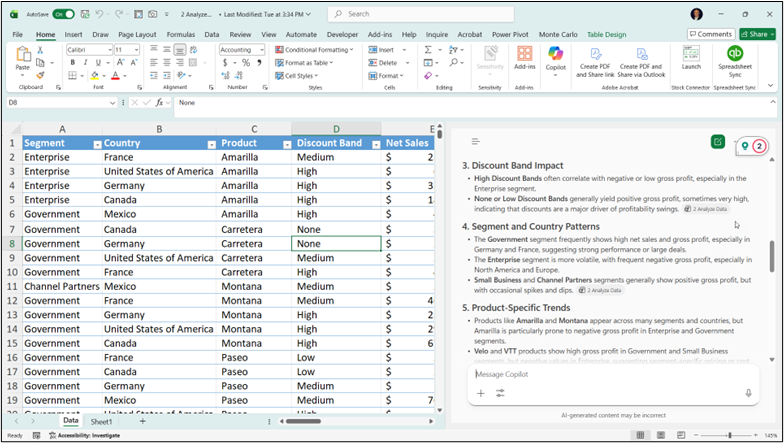
Figure 1. Example of using Copilot to automatically analyze data, without creating formulas.
2. Create PowerPoint presentations the easy way with Copilot
A relatively common occurrence in businesses around the world involves a team member writing a report — perhaps a lengthy one — and then being asked to convert the Word document to a PowerPoint presentation. Adding insult to injury, the presentation file often has an extremely short deadline, increasing pressure on everyone involved to ensure the task is completed on time. With Copilot, that need not be the case!
If the presentation is based on a Word or PDF file, creating the PowerPoint deck can be a quick, straightforward process. To do so, follow these steps.
- Identify the source file for the presentation, typically a Word or PDF document.
- Either upload the source document to your OneDrive account or attach the document to your chat, as shown in Figure 2.
- Enter a prompt such as: Create a PowerPoint slide deck from the attached document.
After entering the prompt, Copilot will create a PowerPoint deck you can use as is. However, you will likely want to make some edits to the slides to ensure the content aligns with your expectations and the formatting is suitable. To do this en masse, change the design in PowerPoint. This procedure will quickly reformat all slides to the same formatting specifications.
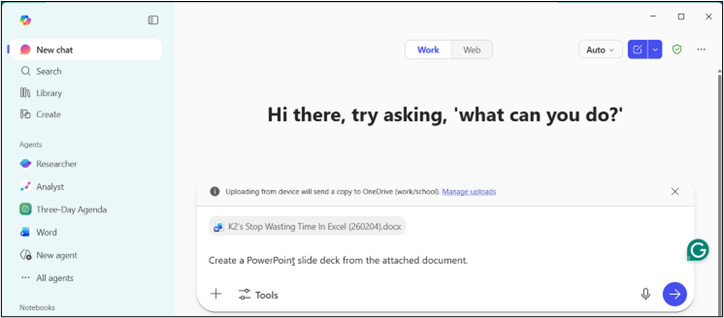
Figure 2. Adding document to Copilot and prompting to create a PowerPoint presentation.
3. Prepare for meetings with Copilot
Suppose you have a very important meeting with one of your best clients scheduled for this afternoon. Unfortunately, due to other issues, you have not had much time to prepare for the meeting. Relax, Copilot can help!
In Copilot, you could issue a prompt similar to the following:
Help me prepare for my meeting with Robbie Lopez. Please gather all emails and related documents you might find in my OneDrive account. Summarize all this information and provide me with the high points of the meeting for which I should be best prepared.
When you issue the prompt above (or a similar one), Copilot will review your data and emails to identify key points from the meeting and summarize them into a concise briefing you can use to prepare. Moreover, Copilot will identify the most important issues to discuss in the meeting, ensuring you are prepared to address these issues.
Here is another meeting feature to consider: If you have an upcoming meeting in Teams, you may want to consider recording it using the Teams recording feature. If you record the meeting, you can instruct Copilot to generate a meeting transcript and create a to-do list for each participant. Doing so helps ensure that all meeting participants understand which follow-up actions they are responsible for.
4. Inspect transactional data sets to identify potential instances of irregularities or fraud
Copilot’s number-crunching engine is quite adept at analyzing large volumes of data and identifying errors, irregularities and even fraud in data sets. For example, you can use Copilot to quickly and easily analyze a set of transactional data to determine whether the data aligns with the expectations in Benford’s Law. (For more information on Benford’s Law and how you can use it to identify errors, irregularities and potential instances of fraud, visit https://en.wikipedia.org/wiki/Benford%27s_law, or simply ask Copilot to tell you about Benford’s Law.)
To illustrate, consider the data extraction shown in Figure 3. The full dataset for this analysis contains approximately 2,200 rows of transactional data and we need to review it to identify any errors, irregularities or potential fraud.
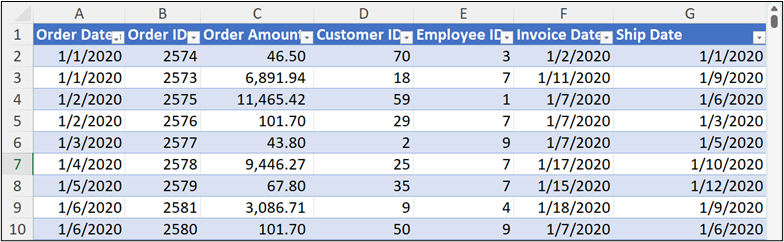
Figure 3. Data for Benford's Law analysis
In this case, we can issue the following prompt into Copilot:
Perform a first-digit, a second-digit, and a first two-digits Benford's law test on the data in this workbook.
After Copilot completes its analyses, we can ask it to summarize the key findings and anomalies. Following is an excerpt from that analysis:
First-digit test
- Expected: Benford’s Law predicts that lower digits (especially 1) should appear most frequently as the leading digit, with frequency decreasing for higher digits.
- Observed: Your data’s first-digit distribution closely follows this pattern, with digit 1 being the most common, and frequencies generally decreasing for digits 2–9.
- Key finding: The dataset shows strong conformity to Benford’s Law for the first digit, suggesting the data is naturally distributed and not artificially manipulated.
- Anomalies: No significant deviations detected.
5. Identifying audit risks with Copilot
One final example of using Copilot in a way many accountants may not realize is to use the platform to help identify audit risks. Suppose that a CPA firm has recently landed a new client in the restaurant business. The client owns and manages 10 fine-dining restaurants in the area and the firm has little institutional knowledge of risk in fine-dining establishments. Further, the client wants the firm to audit the restaurants’ financial statements. To plan an audit program that appropriately addresses risks, the firm can use Copilot to identify them. For example, the audit manager might turn to Copilot and issue prompts such as the following:
I’m an audit manager for a public accounting firm. We have a new client who runs fine-dining establishments. What are some of the key risks for which we should account when planning our audit?
Copilot’s response to the prompt included specific references to 10 categories of risk, including risks in each of the following areas:
- Revenue recognition issues
- Cash handling and fraud risks
- Inventory valuation and Existence
- Cost of sales and margin risk
- Payroll, tips and labor compliance
- Giftcards and deferred revenues
- Lease accounting and right-of-use assets
- Fixed assets and capitalization policies
- Going concern and liquidity risk
- Information technology and point-of-sale system risks
With this information available to the manager, along with other information Copilot can provide, the audit team will be better prepared to conduct thorough, complete audits of each restaurant.
Exploring the AI landscape
No doubt, AI tools such as Copilot are here to stay and offer great promise to elevate efficiency and productivity. However, Copilot in particular seems to be gaining traction across many circles because of its deep Microsoft 365 integration, feature set and adaptability to a wide range of use cases.
If you have access to Copilot, don’t be afraid to experiment to find the unique advantages this platform offers.
Tommy Stephens is a shareholder in K2 Enterprises. At K2, Tommy focuses on creating and delivering content and is responsible for many firm management and marketing functions. You may reach him at tommy@k2e.com and you may learn more about K2 Enterprises at www.k2e.com.